Direct integration is accomplished via server-to-server communication. In this method, a customer is not required to enter card details on the VaultsPay payment page. Furthermore, in this flow, the customer will not be redirected to any eternal route for payment completion unless 3D Secure verification is not activated.
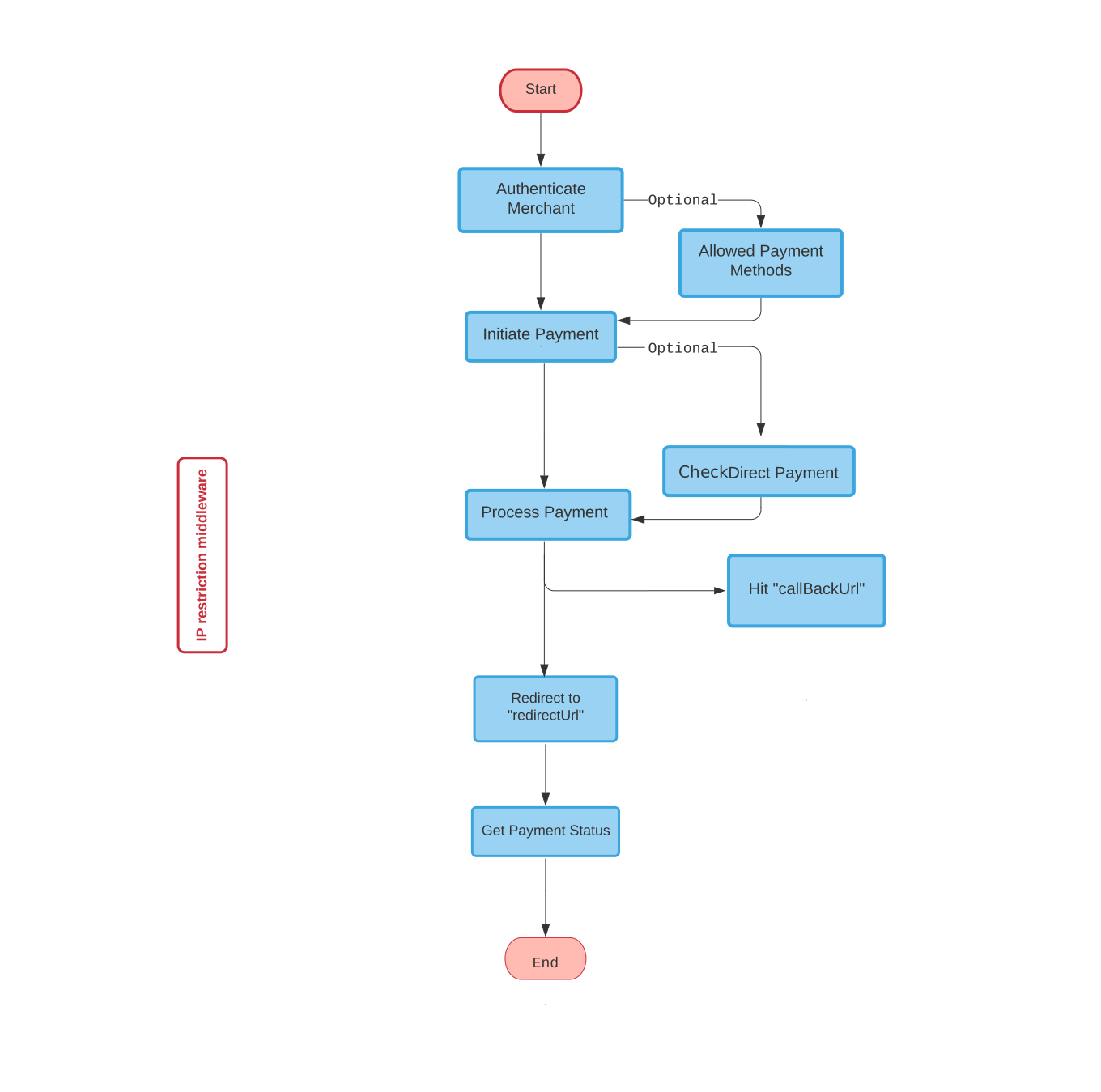
Before you implement Direct Payment, you need to complete the following two steps explained in API Integration.
Request Direct Payment
In this step, VaultsPay will verify if Direct Payment is enabled for your account or not. If you have acquired Direct Payment integration privilege then you will get available payment methods in response to complete the transaction.
You can use this step to check if direct payment is allowed. However, this step is optional. To skip it, pass the parameter schemaReferences=1 in the Initiate Payment API. The same response information will be included in that response, allowing you to move directly to the Process Payment step.
Getting Direct Payment Privilege
If you have PCI compliance for your application then you might be eligible for this privilege. For more information about this requirement please contact VaultsPay customer support.
By default, when requesting a token, the response includes store and channel details. If you only need the token without these details, you can include "storeDetails": 0 in the request body.
API Request
|
paymentId |
PaymentId you have received after initiating a payment in the previous step. |
|---|
POST: https://testapi.vaultspay.com/public/external/v1/check-payment
					  {
    "paymentId": "ID-1111111"
  }
API Response
|
details |
The details object contains information related to payment. |
|---|---|
|
methods |
In methods you will get all available options to complete a payment. In the methods, you will receive the method type, which can be cardPayment, applePay, or googlePay :
|
|
referenceId |
You will be using this referenceId in the next step to complete payment. |
|
addressRequired |
In the methods addressRequired may be true or false. if true then address,state,country,city will be required in the process payment API. |
					{
    "message": "Successful.",
    "code": "200",
    "data":
      {
        "details":
          {
            "name": "Test Merchant",
            "avatar": " ",
            "amount": "100.00000000",
            "currency": "AED",
            "otherInfo": "null",
          },
        "methods":
          [
          {
            "name": "Visa/Master",
            "code": "SCM_0194",
            "type": "1",
            "referenceId": "AP_ETROUZ0ZBZDAU&_MSY4NDA=",
            "methodType": "cardPayment",
            "addressRequired": "true",
          },
          {
            "name": "Google Pay",
            "code": "SCM_0196",
            "type": "3",
            "referenceId": "em1VeHg0QjhYR245TnBnVUVWL0hBVU55MFp6SVVFQ0pvb3BVUUlDdUt3RVpyTDNJUUl6N0V2Z2l5NUFGdFZTUQ=",
            "methodType": "googlePay",
            "paymentUrl": "https://sdk-tst.vaultspay.com/payment-method?paymentId=AP_L1R02ZXZLQWBZ&mt=RDl5ZUtBWEExUFNnS1l1UnQ4WExDQT09%22",
            "addressRequired": "false",
          },
          {
            "name": "Apple Pay",
            "code": "SCM_0197",
            "type": "2",
            "referenceId": "em1VeHg0QjhYR245TnBnVUVWL0hBVEJDcWpJcWFWRkhKdUlCMDdHMzJSVEdWSi9yZ3EwUU1QUkU0RzlkbVF6aA=",
            "methodType": "applePay",
            "paymentUrl": "https://sdk-tst.vaultspay.com/payment-method?paymentId=AP_L1R02ZXZLQWBZ&mt=ZEF5akw0WTU4a2wwSTI2NUN5eDNqdz09%22",
            "addressRequired": "false"
          }
          ]
      }

  }
Process Direct Payment
In the final step, you will send customer information along with card details and the referenceId to complete the payment.
API Request
POST: https://testapi.vaultspay.com/public/external/v1/process-payment
|
referenceId |
referenceId specifies the payment method for this transcation. |
|---|---|
|
country |
This is required only if addressRequired was true in the previous api (Request Payment) response. The country code must be in ISO alpha-2 format (e.g., United Arab Emirates → "AE"). |
|
state |
This is required only if the addressRequired was true in the previous api (Request Payment) response. |
|
city |
This is required only if the addressRequired was true in the previous api (Request Payment) response. |
|
address |
This is required only if the addressRequired is was true in the previous api (Request Payment) response. |
|
cardHolderName/CVC |
This is required for card payment only , Optional for wallet payments such as Apple Pay, Google Pay, or Samsung Pay. |
					{
    "referenceId": "AP_KUE09G4E1HKGV&_XYXYXYX=",
    "name": "John Doe",
    "email": "johndoe@mail.com",
    "phone": "+971 00 0000000",
    "cardHolderName": "John Doe",
    "cardNumber": "4111111111111111",
    "expMonth": "12",
    "expYear": "25",
    "cvc": "111",
    "country": "US",
    "state": "CA",
    "city": "CA",
    "address": "NW CA ST#14"
}
When processing wallet payments such as Apple Pay, Google Pay, or Samsung Pay, include the walletPaymentData object in your request body. The data should be in JSON format as shown below:
|
cryptogramType |
cryptogramType Type of cryptogram used (e.g., "3DSECURE"). |
|---|---|
|
cryptogram |
Encrypted payment data provided by the wallet. |
|
eci |
Electronic Commerce Indicator indicating the security level. |
|
walletTransactionId |
Optional transaction ID from the wallet provider. |
					{
    "cryptogramType": "3DSECURE",
    "cryptogram": "Af9x/J6D4f1uAAAAAAABAQA=",
    "eci": "05",
    "walletTransactionId": ""
}
API Response
|
bypass3DS |
If bypass3DS istrue, the transaction will complete, and its success or failure will be determined by the status in the response:
if the status istrue, the transaction is successful
if the status is false, the transaction has failed. If bypass3DS is false, a redirection to the paymentUrl is required to complete the 3DS process and finalize the transaction. |
|---|
					{
  "message": "Successful.",
  "code": "200",
  "data": {
    "paymentUrl": "https://vaultspay.com/api/v1/gateway-callback/?ref=AP_ETROUZ0ZBZDAU",
    "bypass3DS": "false",
    "transactionId": "AP_ETROUZ0ZBZDAU",
    "dateTime": "2021-08-31T10:20:04.000000Z",
    "status": "true",
    "redirectUrl": "http://localhost/redirect"
  }
}
Complete Direct Transaction:
Now, if you received false in bypass3DS then hit paymentUrl to complete transaction. It is important to hit this paymentUrl otherwise, your payment will not be completed.